What Is a Filtered Indexes in Microsoft SQL Server?
A nonclustered index stores only rows matching a WHERE filter; it can be much smaller for frequently queried subsets.
How the Filtered Indexes Algorithm Works
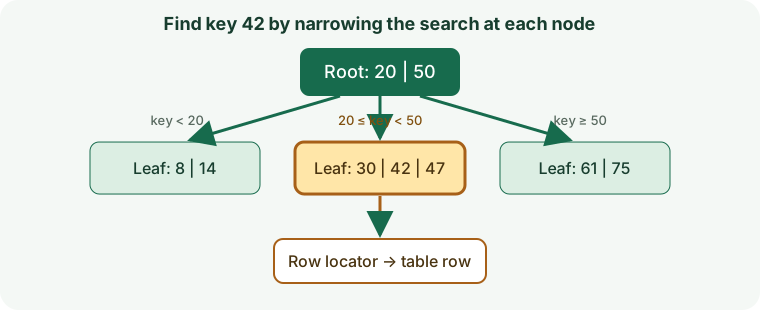
A nonclustered index stores only rows matching a WHERE filter; it can be much smaller for frequently queried subsets.
When to Use Filtered Indexes
Sparse states such as ready jobs, active rows, or non-null optional values.
How to Create a Microsoft SQL Server Filtered Indexes
Review data quality, existing structures, feature support, build time, and deployment requirements before creating an index on a production table.
CREATE INDEX IX_Jobs_Ready ON dbo.Jobs (RunAt) WHERE Status = N'Ready';Filtered Indexes Query Example
This example demonstrates the matching query shape. Check the execution plan to confirm that the engine can use the index.
SELECT TOP (50) JobId FROM dbo.Jobs WHERE Status = N'Ready' AND RunAt <= SYSUTCDATETIME() ORDER BY RunAt;Queries Supported by Filtered Indexes
Sparse states such as ready jobs, active rows, or non-null optional values. A similar-looking predicate may not use the same access path; operators, expressions, key order, and data type all matter.
Read Performance, Storage, and Write Costs
The optimizer needs a compatible query predicate; SQL Server limits filter expressions. Indexes reduce some search work but require storage and add maintenance to writes.
Filtered Indexes Limitations and Common Mistakes
Parameterized predicates and SET options can affect use; verify the application query plan.
Do not assume that an index being present means the optimizer chose it or that the query became selective.
How to Measure and Tune Filtered Indexes
Check actual plans and filtered statistics; keep predicates simple and workload-aligned.
Compare representative plans and timings before and after, including concurrent writes and realistic data volumes.
Filtered Indexes Questions
Will the database always use this index?
No. The optimizer weighs selectivity, estimated costs, statistics, cache state, and the amount of data returned.
What should I verify before production?
Confirm version support, query compatibility, write overhead, build/rollback procedures, and index behavior during backup and recovery.
Official Microsoft SQL Server Index Documentation
Check Microsoft Learn: SQL Server Indexes for release-specific requirements and supported operators.