What Is a Microsoft SQL Server Index?
An index is a data structure that helps the database find candidate records without scanning every row. It can accelerate matching queries but requires storage and maintenance during writes.
How Microsoft SQL Server Index Algorithms Work
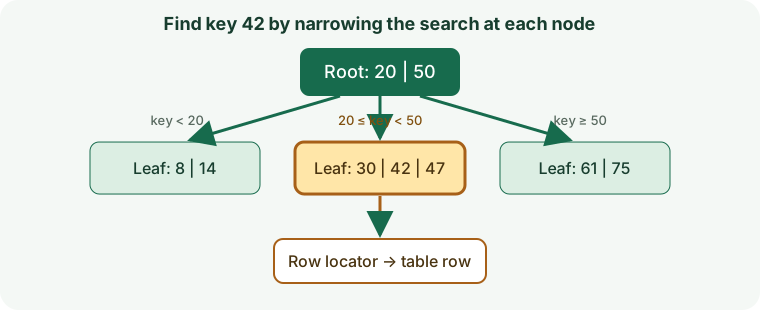
SQL Server supports rowstore B-trees, columnstore indexes, and specialized XML, spatial, full-text, and memory-optimized indexes. Clustered rowstore leaves contain table rows.
Microsoft SQL Server Index Types and Individual Guides
Each link opens its own guide with an algorithm image, create/query example, use cases, limitations, and tuning steps.
Which Microsoft SQL Server Index Should I Use?
Choose rowstore for selective transactional seeks, columnstore for analytics, filtered indexes for stable subsets, and specialized structures for XML, spatial, or text queries.
Start with the query workload, required consistency, ordering, data distribution, and write rate. Do not select a structure from its name alone.
Match Indexes to Filters, Sorts, and Joins
Write down the actual predicates, sort keys, joins, and returned columns. The order of keys and supported operators determine whether the engine can use an index.
How to Read Microsoft SQL Server Query Plans
Use the engine's explain or execution-plan tooling to compare estimated and actual rows, keys examined, pages read, sorting, filtering, and lookup operations.
Index Storage and Write Performance
Indexes use disk and cache and add work to inserts, updates, and deletes. Specialized indexes may emit multiple entries per row or maintain separate structures.
Index Statistics and Maintenance
Monitor size, usage, build state, selectivity, fragmentation or compaction where relevant, and write latency. Make maintenance changes using the engine's version-specific procedures.
Common Microsoft SQL Server Indexing Mistakes
- Adding indexes without checking real query plans.
- Ignoring key order, operator compatibility, or data distribution.
- Assuming an index removes all filtering or row-fetch work.
- Forgetting write amplification, backups, and deployment impact.
Microsoft SQL Server Index Version and Feature Notes
Available index types and behavior vary by engine release, storage engine, extension, edition, data type, and operator. Verify each feature against the database actually deployed.
Official reference: Microsoft Learn: SQL Server Indexes.
Microsoft SQL Server Indexing Questions
Does adding an index guarantee a faster query?
No. The optimizer may choose a table or partition scan when many rows match or index lookups would cost more.
Should every searchable column have an index?
No. Index only measured workloads and account for maintenance, storage, and data distribution.